
Step 1: Measure the packaged shipment
Measure the finished length, width, and height in inches, and use the total packaged weight in pounds.

Calculator Results
View the class-by-class guide for interpreting your density-based result.
Freight class is a rating category used for LTL shipments. Lower density-based classes generally reflect denser freight, while higher classes generally reflect lighter or lower-density freight. The class itself is not a freight price; carriers use class along with lane, weight, accessorials, discounts, and tariff rules to rate a shipment. Fuel surcharge may also be added to the freight charges; Greenspark's Fuel Surcharge Calculator can estimate fuel surcharge using either a fuel index / MPG method or a percentage of net linehaul.
| Common Result | How to Read it |
|---|---|
| Class 50 | The highest-density result on this density scale. This range starts at 50.00 lb/cu ft or greater. |
| Class 55 | A very dense result. On this calculator's scale, Class 55 covers 35 to less than 50 lb/cu ft. |
| Class 70 | A relatively dense result. Class 70 covers 15 to less than 22.5 lb/cu ft on this density scale. |
| Class 85 or 92.5 | Middle density ranges. Class 85 covers 12 to less than 15 lb/cu ft, while Class 92.5 covers 10 to less than 12 lb/cu ft. Results near a threshold may move into a neighboring class with small dimension or weight changes. |
| Class 100 | A common mid-density result. On this density scale, Class 100 begins at 8.00 lb/cu ft. |
| Class 125 | A lighter result than Class 100. This calculator maps 6 to less than 8 lb/cu ft to Class 125. |
| Class 175 and higher | Lower-density results on this scale, generally using more cubic space per pound than lower-numbered classes. |
For a deeper look at freight density ranges and class brackets, see the Freight Class Chart page.Need only the density? Use the Freight Density Calculator.
Measurement Guide
Open the full packaged-freight measurement checklist and visual guide.
Measure the shipment after it is fully packaged. Use the maximum outside length, width, and height, including the pallet or skid, packaging, wrap, and any overhang.
 Tap for full size
Once you have the finished dimensions and total packaged weight, enter them in the Freight Class Calculator.
Calculator logic
To determine freight class, start with the finished packaged shipment. Measure its length, width, and height, and use the total packaged weight. First calculate the shipment’s cubic feet, then divide the packaged weight by the cubic feet to calculate freight density. Use the formulas below with your shipment’s measurements and weight. The supporting example shows how the calculation works using sample values.
Measure the finished length, width, and height in inches, and use the total packaged weight in pounds.
(48 × 40 × 42) ÷ 1,728 = 46.67 ft³
900 ÷ 46.67 = 19.29 lb/ft³
Compare the calculated density with the Freight Class Table to find the corresponding density-based freight class.
Density: 19.29 lb/ft³ → estimated freight class 70.
Density provides the density-based freight class estimate. Handling, stowability, liability, and applicable commodity or NMFC provisions can also affect the final freight class.
CALCULATION EXAMPLE
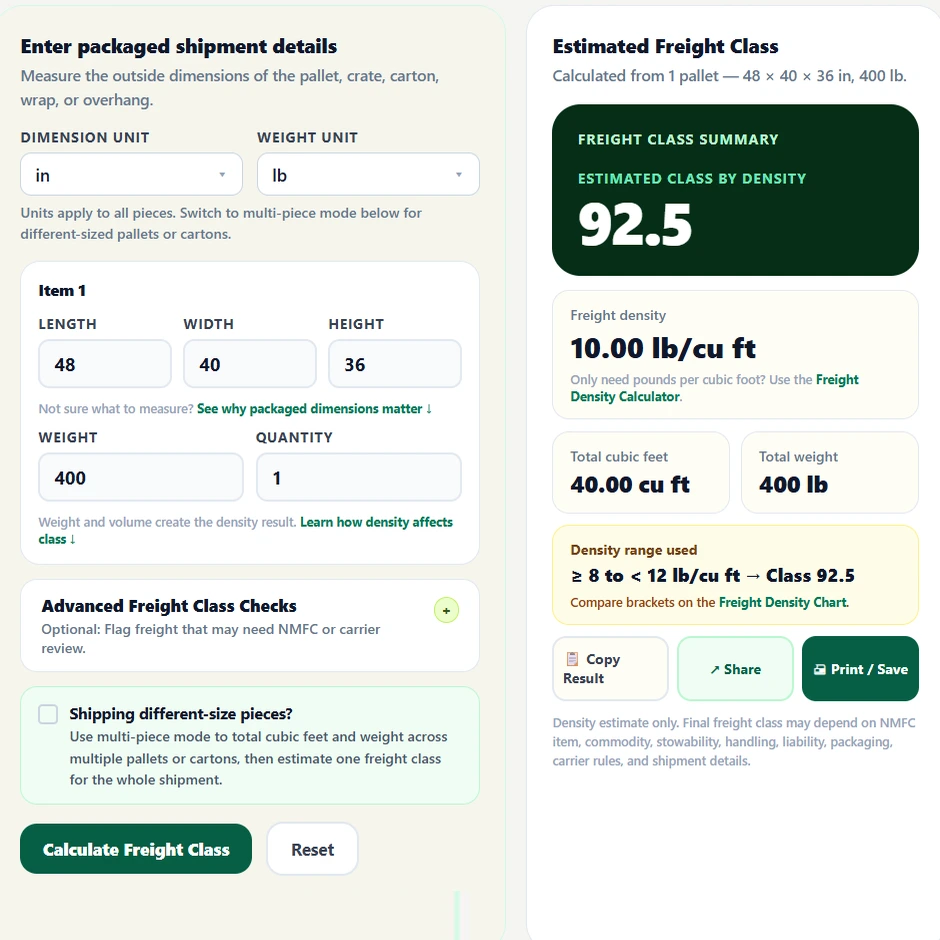
In this example let us consider a shipment that measures 48 × 40 × 36 inches and weighs 400 lb — that gives you 40.00 cubic feet of volume. Now we divide the weight by the volume: 400 ÷ 40.00 = 10.00 lb/cu ft, which places this shipment in Class 92.5.
PACKAGING CHANGES
These examples keep shipment weight the same while reducing packaged height or pallet overhang. A smaller finished cube increases density and may move the shipment into a different density-based class.
The same 300 lb shipment occupies less vertical space.
Before
48 × 40 × 36 in · 7.50 lb/ft³ · Class 125
4 inches lower ↓
After
48 × 40 × 32 in · 8.44 lb/ft³ · Class 100
A smaller outside footprint raises density.
Before
52 × 44 × 40 in · 13.22 lb/ft³ · Class 85
Footprint reduced ↓
After
48 × 40 × 40 in · 15.75 lb/ft³ · Class 70
Reducing crate height moves the shipment into a denser tier.
Before
60 × 48 × 48 in · 20.00 lb/ft³ · Class 70
8 inches lower ↓
After
60 × 48 × 40 in · 24.00 lb/ft³ · Class 65
A few inches or pounds can matter more than you'd expect. Carrier inspectors measure the full packaged shipment — pallet, wrap, crate, overhang and all — so if your dimensions don't account for that, the estimate and the final bill may not match.
Small changes in finished dimensions or packaged weight can move a shipment into a Density Bracket: Class 85 . The interactive Freight Class Chart shows how many lb/ft³ separate the selected density from the next denser and less-dense class boundaries. Density Bracket: Class 70 .
Example: A shipment at 14.73 lb/ft³ is in the Class 85 density range and is only 0.27 lb/ft³ below the 15 lb/ft³ threshold where the Class 70 density range begins.
Results this close to a boundary deserve extra measurement attention because pallet height, overhang, packaging changes, or a weight correction can change the density-based estimate.
Current 13-tier scale
Compare all 13 current density ranges with estimated freight classes and packaged shipment examples. View the full-size chart or download the PDF or PNG version.

Current density-based LTL scale.
Density measured in lb/ft³
Find the density range that matches your calculated result on the current 13-tier scale.
| Density, lb/cu ft | Estimated Class | Possible Packaged Examples |
|---|---|---|
| Less than 1 | 400 | Pillows, comforters, packing materials |
| 1 to less than 2 | 300 | Lightweight tables, chairs, model boats |
| 2 to less than 4 | 250 | Lightweight furniture, televisions, bulky household goods |
| 4 to less than 6 | 175 | Clothing, stuffed furniture, metal cabinets |
| 6 to less than 8 | 125 | Small appliances, exhibit displays, vending equipment |
| 8 to less than 10 | 100 | Vacuum equipment, wine cases, packaged furnishings |
| 10 to less than 12 | 92.5 | Plastic storage products, tires, packaged electronics |
| 12 to less than 15 | 85 | Transmissions, doors, packaged engine parts |
| 15 to less than 22.5 | 70 | Forklift batteries, crated engines, compact machinery |
| 22.5 to less than 30 | 65 | Tile, cooking oil, electrical cable |
| 30 to less than 35 | 60 | Steel cable, bottled beverages, compact automotive parts |
| 35 to less than 50 | 55 | Hardwood flooring, cement products, dense printed materials |
| 50 or greater | 50 | Dense metal parts, steel fasteners, industrial hardware |
Density-based planning reference only. Final freight class may depend on commodity classification, packaging, handling, stowability, liability, carrier rules, and shipment details.
Use this quick reference to see approximately how much a fully packaged 48 × 40 × 48 in pallet would weigh at common freight-density breakpoints.
A 48 × 40 × 48 in pallet occupies about 53.33 ft³. Multiply density by 53.33 to estimate the total pallet weight at that density.
Freight class references
Detailed guides for individual freight classes, including density ranges, shipment examples, comparisons, and calculators.
50 lb/ft³ and above
See when very dense freight reaches the 50 lb/ft³ threshold, with worked examples, Class 55 comparisons, and the Class 50 calculator.
Freight Class 5035 to under 50 lb/ft³
Review the 35 to under 50 lb/ft³ Class 55 range, including key breakpoints, shipment examples, and the Class 55 calculator.
Freight Class 5522.5 to under 30 lb/ft³
See how weight, dimensions, and packaging affect shipments in the 22.5 to under 30 lb/ft³ range, plus the Class 65 calculator.
Freight Class 6515 to under 22.5 lb/ft³
Learn how shipment volume and weight produce Class 70 density, with worked examples, Class 65 and 85 comparisons, and the Class 70 calculator.
Freight Class 7012 to under 15 lb/ft³
Review Class 85 examples in the 12 to under 15 lb/ft³ range and see how they compare with Classes 70 and 92.5.
Freight Class 8510 to under 12 lb/ft³
Examine the narrow 10 to under 12 lb/ft³ Class 92.5 range, including exact boundaries, comparison examples, and the Class 92.5 calculator.
Freight Class 92.58 to under 10 lb/ft³
Review the 8 to under 10 lb/ft³ Class 100 range, with worked examples and direct comparisons to Classes 92.5 and 125.
Freight Class 1006 to under 8 lb/ft³
See how lower-density shipments fall into Class 125, with 6 to under 8 lb/ft³ examples, nearby breakpoints, and the Class 125 calculator.
Freight Class 125Looking for a commodity instead? Lookup 200+ commodities with the Freight Class Lookup Tool
Freight Planning Calculators
Use freight class, density, pallet, linear feet, CBM, fuel surcharge, truck fuel cost, and DOT hazard lookup tools together—from shipment measurements to transportation costs and hazardous-material reference.
Use this when you need an estimated freight class.
Estimate freight class from packaged dimensions, weight, and density.
Use this when you only need cubic feet and density.
Calculate shipment volume and pounds per cubic foot without the freight-class workflow.
Use this when you are planning a palletized shipment.
Work with pallet dimensions, shipment weight, density, and pallet configuration.
Use this when trailer-space usage is the question.
Estimate how many linear feet your packaged freight occupies inside a trailer.
Use this when shipment volume needs to be in cubic meters.
Calculate CBM for cartons, pallets, and mixed-product freight dimensions.
Use this when you need a fuel surcharge estimate.
Use MPG or linehaul % with weekly EIA diesel prices to estimate fuel surcharge.
Use this when you need to estimate the actual diesel cost of a truck trip.
Calculate fuel gallons, trip cost, and cost per mile using distance, MPG, and diesel prices.
Use this when you need to identify hazardous-material classifications.
Look up DOT hazard classes, UN/NA numbers, placards, and material information.
Freight Class Lookup
Explore shipment examples, packaging considerations, and calculator guidance for common freight categories.
Machinery Freight Class
Skidded, crated, irregular, and oversized machinery shipments.
Machine Parts Freight Class
Packaging and density considerations for machine components.
Engines Freight Class
Crated, palletized, and protected engine shipments.
Cabinets Freight Class
Cabinet construction, packaging, and shipment-density examples.
Electronics Freight Class
Packaged electronics, equipment, and handling considerations.
Furniture Freight Class
Palletized, boxed, assembled, and flat-packed furniture.
Freight Class Lookup
Browse freight class pages for machinery, electronics, furniture, food, packaging, hose, and auto parts.
Calculator questions
Yes. Add a separate item group for each different size or weight. The calculator combines all item volumes and weights into one shipment-level density and freight class.
Yes. Measure the complete packaged shipment, including the pallet, crate, carton, wrap, and any overhang.
Use these visual references to review the calculator, understand the result, and compare freight density with the current class scale.
 Tap for full size
Calculator guidance and freight class reference information.
Have these details ready for the finished packaged shipment.
Dimension units can be inches, feet, or centimeters. Weight can be pounds or kilograms. Measure the complete packaged shipment, including pallet, crate, carton, wrap, padding, and overhang.
Measure the shipment after it is fully packaged. Use the maximum outside length, width, and height, including the pallet or skid, packaging, wrap, and any overhang.
Tap for full size
Follow these steps to calculate and review a shipment-level freight class estimate.
Use Same size / weight for identical pieces. Use Different sizes / weights when dimensions or weight changes.
Select inches, feet, or centimeters for dimensions and pounds or kilograms for weight. Units apply to all item groups.
Enter the finished outside length, width, height, packaged weight, and quantity. The example shipment is preloaded; change any field to calculate your shipment.
Flag hard-to-stack, fragile or high-value, irregular, hazmat, or known NMFC/carrier-specific conditions that may affect classification beyond density.
Review freight class, density, cubic feet, total weight, and any carrier-review warnings.
Identical pieces: choose Same size / weight, enter the dimensions and weight once, then set Quantity to the number of identical pieces.
Mixed freight: choose Different sizes / weights and add one item group for each unique size or weight. The calculator combines total packaged weight and total cubic volume into one shipment-level density and freight class estimate.
Freight class is a rating category used for LTL shipments. Lower density-based classes generally reflect denser freight, while higher classes generally reflect lighter or lower-density freight. The class itself is not a freight price; carriers use class along with lane, weight, accessorials, discounts, and tariff rules to rate a shipment.
| Common Result | How to Read it |
|---|---|
| Class 50 | The highest-density result on this density scale. This range starts at 50.00 lb/cu ft or greater. |
| Class 55 | A very dense result. On this calculator's scale, Class 55 covers 35 to less than 50 lb/cu ft. |
| Class 70 | A relatively dense result. Class 70 covers 15 to less than 22.5 lb/cu ft on this density scale. |
| Class 85 or 92.5 | Middle density ranges. Class 85 covers 12 to less than 15 lb/cu ft, while Class 92.5 covers 10 to less than 12 lb/cu ft. Results near a threshold may move into a neighboring class with small dimension or weight changes. |
| Class 100 | A common mid-density result. On this density scale, Class 100 begins at 8.00 lb/cu ft. |
| Class 125 | A lighter result than Class 100. This calculator maps 6 to less than 8 lb/cu ft to Class 125. |
| Class 175 and higher | Lower-density results on this scale, generally using more cubic space per pound than lower-numbered classes. |
For all 13 density ranges, see the Freight Class Chart.


