Choose shipment pieces
Use Same size / weight for one or multiple identical pieces. Use Different sizes / weights when multiple pieces have different dimensions or weights.

Freight density measures how much packaged shipment weight occupies each cubic foot of space.
How to use
Freight density is calculated in pounds per cubic foot (lb/ft³), also called PCF. PCF can be calculated for single or multiple pieces, including shipments with different sizes and weights.
Use Same size / weight for one or multiple identical pieces. Use Different sizes / weights when multiple pieces have different dimensions or weights.
Measure the full outside size, including pallet, skid, crate, carton, wrap, and overhang.
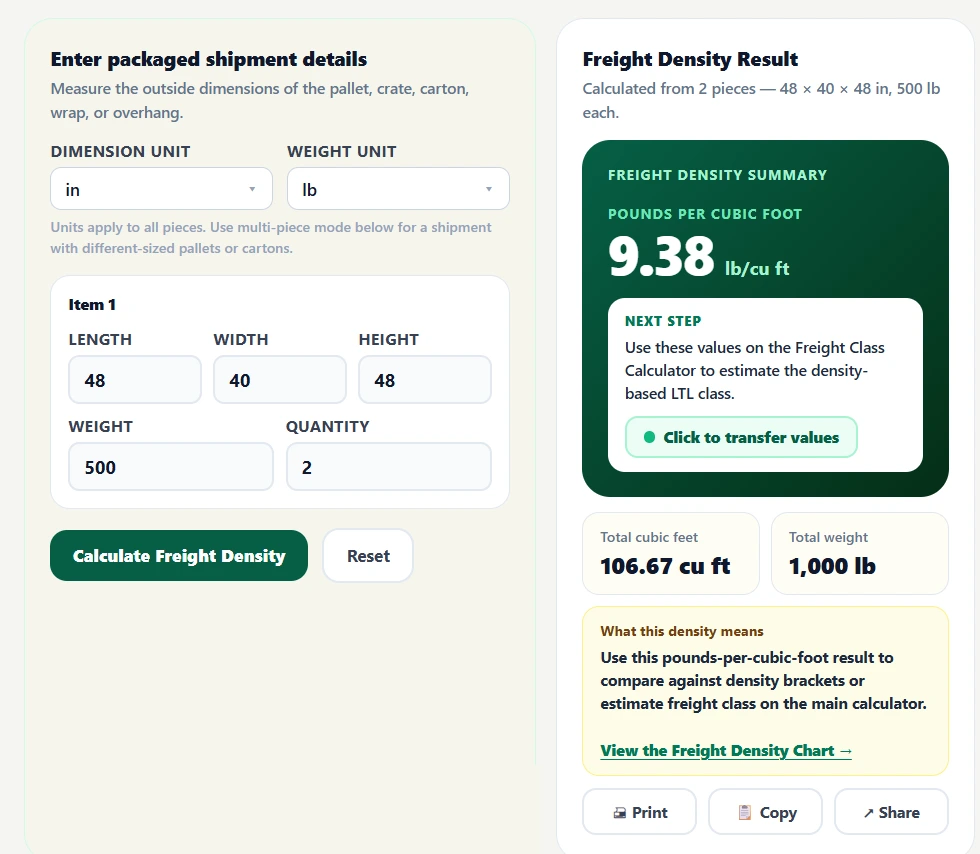
Check cubic feet, total weight, and freight density, then transfer the shipment to the Freight Class Calculator when needed.
Result interpretation
Freight density tells you how much packaged shipment weight occupies each cubic foot. A higher or lower number is not a quality score—it simply describes how tightly the shipment's weight is packed into its measured volume.
Higher density
More weight is packed into each cubic foot. If weight stays the same while packaged volume decreases, density rises.
Lower density
The same weight occupies more cubic space. If packaged volume increases while weight stays the same, density falls.
Density and class
After calculating pounds per cubic foot, compare your result with the current density-based freight class ranges. Higher-density freight generally falls toward lower-numbered classes, while lower-density freight generally falls toward higher-numbered classes.
Compare all 13 current density ranges with estimated freight classes and representative packaged shipment examples. Download the freight class chart PDF or share the chart directly.
Compare neighboring density ranges to see exactly where one density-based freight class ends and the next begins.
| Density, lb/ft³ | Density-based estimate |
|---|---|
| 12 to under 15 | Freight Class 85 |
| 15 to under 22.5 | Freight Class 70 |
| 22.5 to under 30 | Freight Class 65 |
Need to look up the new 13-tier density ranges chart? See the Freight Class Chart
Near-threshold example
A 48 × 40 × 40 inch shipment weighing 640 lb occupies 44.44 ft³ and has a density of 14.40 lb/ft³, just below the 15 lb/ft³ boundary.
If the finished height is actually 38 inches at the same weight, volume drops to 42.22 ft³ and density rises to about 15.16 lb/ft³. That moves the density-based estimate from the Class 85 range into the Class 70 range.
The point is measurement accuracy—not changing packaging to target a class. Final freight classification can depend on factors beyond density.
Measurement accuracy
Freight density changes when shipment size or weight changes. Small measurement errors in finished height, overhang, wrapping, crate size, or packaged weight can shift the pounds-per-cubic-foot result.
Use the complete outside packaged dimensions. Include the pallet, skid, crate, carton, wrap, corner protection, and anything else that increases the occupied space.
If freight extends beyond its base or packaging bows outward, use the widest and longest finished outside points rather than a nominal pallet or carton size.
Measure the maximum outside length, width, and height—the smallest rectangular space that fully contains the packaged shipment.
Density uses the shipment weight that goes with those finished dimensions. For multiple item groups, use the packaged weight for each group so the totals match the measured volume.
Calculator Formulas
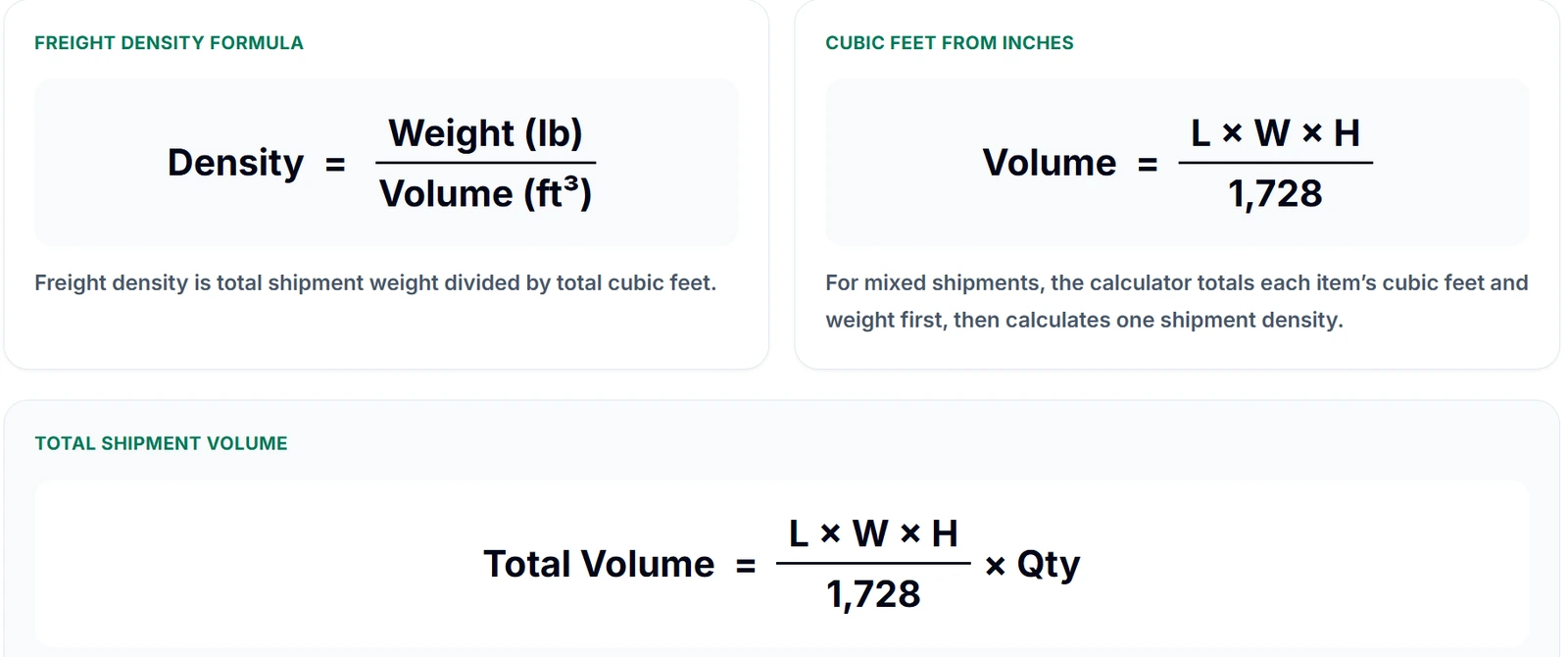
This tool calculates freight density from the full packaged shipment size. The calculator converts units when needed, calculates cubic feet, totals the shipment weight, and then divides total pounds by total cubic feet. Have items measured in different units? Greenspark's CBM Calculator lets you use a different unit for each item group and transfer the combined volume and weight to this calculator.
Freight density is total packaged shipment weight divided by total cubic feet. The result is expressed in lb/ft³ or PCF.
When dimensions are measured in inches, multiply length × width × height and divide by 1,728 to convert cubic inches to cubic feet.
CALCULATION EXAMPLE
A packaged handling unit measuring 48 × 40 × 36 inches has 40.00 cubic feet of volume. At 400 lb, its freight density is 10.00 lb/ft³.
MULTI-ITEM DENSITY
For different item groups, add their volume and weight totals, then divide combined weight by combined cubic feet.
Item Group 1
2 × 48 × 40 × 36 in
400 lb each · 80.00 ft³ · 800 lb total
Item Group 2
1 × 48 × 48 × 48 in
600 lb · 64.00 ft³
Combined Result
1,400 lb ÷ 144.00 ft³
9.72 lb/ft³
PACKAGING CHANGES
These examples keep shipment weight the same while reducing packaged height or pallet overhang. When the finished cube gets smaller, the same weight occupies fewer cubic feet and freight density rises.
The same 300 lb shipment occupies less vertical space.
Before
48 × 40 × 36 in · 40.00 ft³
7.50 lb/ft³
4 inches lower ↓
After
48 × 40 × 32 in · 35.56 ft³
8.44 lb/ft³
Density increased 12.5%
A smaller outside footprint raises density.
Before
52 × 44 × 40 in · 52.96 ft³
13.22 lb/ft³
Footprint reduced ↓
After
48 × 40 × 40 in · 44.44 ft³
15.75 lb/ft³
Density increased 19.2%
Reducing crate height packs the same weight into less cubic space.
Before
60 × 48 × 48 in · 80.00 ft³
20.00 lb/ft³
8 inches lower ↓
After
60 × 48 × 40 in · 66.67 ft³
24.00 lb/ft³
Density increased 20.0%
Working with palletized freight? Use the Pallet Freight Calculator to calculate pallet density and freight class.
Freight Planning Calculators
Use freight class, density, pallet, linear feet, CBM, fuel surcharge, truck fuel cost, and DOT hazard lookup tools together—from shipment measurements to transportation costs and hazardous-material reference.
Use this when you only need cubic feet and density.
Calculate shipment volume and pounds per cubic foot without the freight-class workflow.
Use this when you need an estimated freight class.
Estimate freight class from packaged dimensions, weight, and density.
Use this when you are planning a palletized shipment.
Work with pallet dimensions, shipment weight, density, and pallet configuration.
Use this when trailer-space usage is the question.
Estimate how many linear feet your packaged freight occupies inside a trailer.
Use this when shipment volume needs to be in cubic meters.
Calculate CBM for cartons, pallets, and mixed-product freight dimensions.
Use this when you need a fuel surcharge estimate.
Use MPG or linehaul % with weekly EIA diesel prices to estimate fuel surcharge.
Use this when you need to estimate the actual diesel cost of a truck trip.
Calculate fuel gallons, trip cost, and cost per mile using distance, MPG, and diesel prices.
Use this when you need to identify hazardous-material classifications.
Look up DOT hazard classes, UN/NA numbers, placards, and material information.
Freight Class Lookup
After calculating density, explore shipment examples, packaging considerations, and calculator guidance for common freight categories.
Machinery Freight Class
Skidded, crated, irregular, and oversized machinery shipments.
Machine Parts Freight Class
Packaging and density considerations for machine components.
Engines Freight Class
Crated, palletized, and protected engine shipments.
Cabinets Freight Class
Cabinet construction, packaging, and shipment-density examples.
Electronics Freight Class
Packaged electronics, equipment, and handling considerations.
Furniture Freight Class
Palletized, boxed, assembled, and flat-packed furniture.
Freight Class Lookup
Browse freight class pages for machinery, electronics, furniture, food, packaging, hose, and auto parts.
Industry News: Did you know?
The YRC Freight density calculator was a popular tool used by shippers to calculate freight density for LTL shipments until Yellow Corporation, the parent company of YRC Freight, ceased operations on July 30, 2023.
Visual guide
View these supporting visuals when you want a quick look at the calculator interface, its output, or the formulas behind the density result.
 Tap for full size